

If you want your website to rank higher in search engine results, you need to remove harmful backlinks. Backlinks are important for SEO because they let Google know that other websites think your content is valuable and worth linking to.
All backlinks are not created equal. Some backlinks can harm your website’s ranking. That’s where Google’s backlink disallow tool comes into play.
Disavow is a tool that allows you to select which backlinks you want Google to ignore when ranking your site. This can be useful if you’ve had bad or spammy links in the past. It can also be useful if you think a competitor is trying to hurt your ranking by creating bad links. Google will ignore your site for bad links if you disavow them.
Finding harmful backlinks
First, you need to find those backlinks that negatively impact your SEO performance and disavow them. Tools such as Google Search Console provide valuable information into your website’s backlink profile crucial for SEO companies in Kuala Lumpur.. Look for low-quality backlinks, such as those from sites that aren’t in your industry, those with low domain authority, and those with spammy behavior. Remember that the goal of a good backlink profile is to improve, not harm, the reliability and rankings of your site.
Why Use Google Disavow & What Does It Mean?
Google Disavow is one of the most powerful tools that enables website owners to request Google to disregard certain backlinks when evaluating the ranking of their website. This tool can be used to deal with spam or poor-quality backlinks that may interfere with your SEO. By disavowing these backlinks, you can avoid penalties and keep your website in the search engine results pages (SERPs), especially in the highly competitive digital market.
Step-by-Step Guide to the Disavow Process
Before you begin to disavow links, it is important to try to manually remove them by contacting the site owners that link to your site. If that doesn’t work, you can try using Google’s Disavow tool: Here’s how you can use it:
Create a List of Links to Disavow: Create a text file (.txt) with one line for each disavowed URL or domain name. To reject a whole domain, prefix it with “domain:” (e.g., spammysite.com).
Access the Disavow Tool: Use Google Search Console to access the Disavow Tool. Select your website and upload your file under the Disavow Links section.
Wait for Processing: Once you submit your request, Google will gradually remove the disavowed links from your link profile’s assessment.
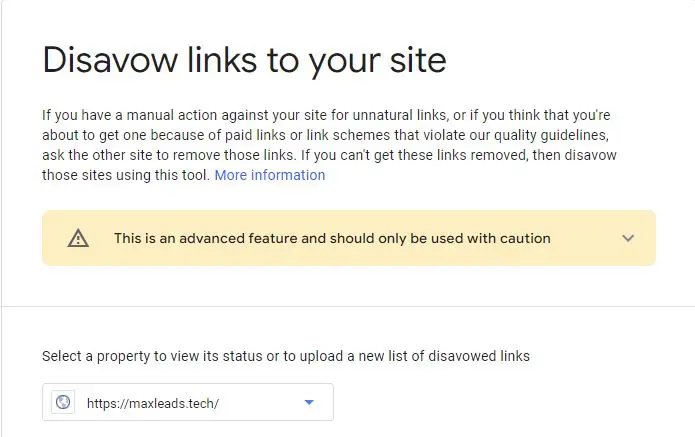
Please note that the Google Disavow links tool should only be used as a last resort after you have manually removed the spam links. This tool is not a fast fix for bad unwanted backlinks.
Is it possible to cancel a link disavowal?
Yes, it is possible to undo a link disavowal. When you disavow a link, you tell Google not to consider it when analyzing the authority and relevance of your website. Just remove the link from your disavow file and share the updated file with Google Search Console to undo the disavowal.
However, it’s important to think about the effect of reversing a refusal. When you re-include a link, Google will re-evaluate its effect on your site’s ranking. If you’re re-including a link that was once rejected because it was spammy or harmful, it could hurt your SEO rankings.
The quality and relevance of the link to your website should be considered before you undo the disavow. If you are unsure whether to undo the disavow, talk to SEO Services in Kuala Lumpur based on your circumstances. Also, remember that Google may take some time to crawl the previously disavowed links and review your website’s backlink profile.
Conclusion
Google’s Disavow Tool fixes fake backlinks to improve your website’s ranking. Use this tool wisely and only fix links that pose a real threat to your site’s SEO performance. It’s important to regularly monitor your backlink profile. By doing so, you can quickly remove any newly found bad links.
The Disavow Tool can help you improve your website’s search engine ranking and drive more organic traffic. Keep in mind that proper backlink maintenance is crucial for maintaining a robust online presence.
Search engine optimization (SEO) and digital marketing are complex and time-consuming tasks that can be easily overwhelmed if left to your own devices. That’s why we at MaxLeads Tech specialize in providing top SEO services in Kuala Lumpur that will boost your website’s performance and drive massive traffic to your online presence.